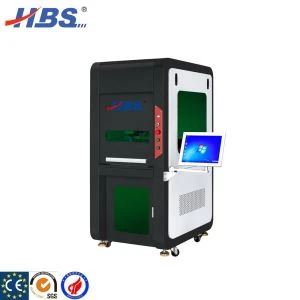
1. Machine Size
Machine Height : 1700mm Machine Width : 78mm Lower length : 1400mm Upper length : 800mm Rotate table radius : 300mm Rotate table height : 170mm
Machine packing gross weight: 440kg Packing size: 1660mm*965mm*1960mm Packing volume: 3.14cbm
2. Main button & function in machine front side

a.Auto mark
b.Auto rotation
c.Power button
d.Z axis (laser head up)
e.Z axis (laser head down)
f.USB connections
g.Emergency button
h.Rotation speed control (adjustable)
I/j. Operator working button(operate machine start or stop)
3. Rotation Table
Types of table
We have two types of the rotation table, that is 2-separated and 4 separated. For 2-separated table, each time the table will rotate 180° for marking and the 4-separated table will rotate 90°for marking.

2-separated rotation table(2 chambers) 4-separated rotation table(4 chambers)
4. Table Size

Rotation table diameter: 600mm
Rotation table separator shield height: 170mm
5. Rotation speed control & adjustment

There is one ''speed control'' panel fixed on the right side of the machine, operator can determine table movement by adjusting the rotation speed, interval time, etc.
6.Working mode
The two button will determine working mode. Upper button is sending marking command while the lower button sending rotation command. There are 4 modes of marking, manual marking, semi-auto marking, fully-auto marking, etc.

No.5 No.6 No.7 No.8
Mode One: When both upper button and lower button turns right (Refer to picture No. ), the machine will works fully automatic. That is, the table will rotate automatically and waiting for a certain time then will rotate again, during the interval waiting time, the machine will marks automatically. Once the machine start working, it will automatically ''Turning- Stop-Marking
-Turning -Stop- Marking'' without stop. In this process, the operator have enough time to unload marked parts and load the none-marked parts.
Mode Two: When both upper button and lower button turns left(refer to picture No. 2), the machine will works manually totally. The operator have to press rotation button and machine will rotates, while press mark button and then the machine will start marking.
Mode Three: Upper left, lower right, (refer to picture No.) Operator have to press mark button to start mark, after marking the table will rotate automatically to next chamber.
Mode Four: Upper right, lower left, (refer to picture No.), you just need to press rotation button and the machine will rotate, after rotation the machine will mark automatically.
Hot Tags: rotating 4-platform high-efficiency laser marking machine, China, manufacturers, suppliers, company, cheap, buy discount, low price, 20w Four Split Marking Fiber Laser Marking Machine, Small Laser Engraver To Mark Logo, 20W Compact Size Fiber Laser Marker, Electric Engraving Pen, Laser Marking Machine, Cheaper Fiber Laser Marking Machine